BeadaPanel Versatile Media Display
-
almondsweave
- Posts: 3
- Joined: Fri Mar 21, 2025 6:01 pm
Post
by almondsweave » Fri Mar 21, 2025 7:00 pm
Hi
My BeadaPanel 2W is not booting correctly. The display turns on but only the backlight. Screen is black
Tried different cables with no luck.
I went searching here on the forum and found this suggestion:
https://www.esky-sh.com/bbs/viewtopic.php?f=30&t=1062
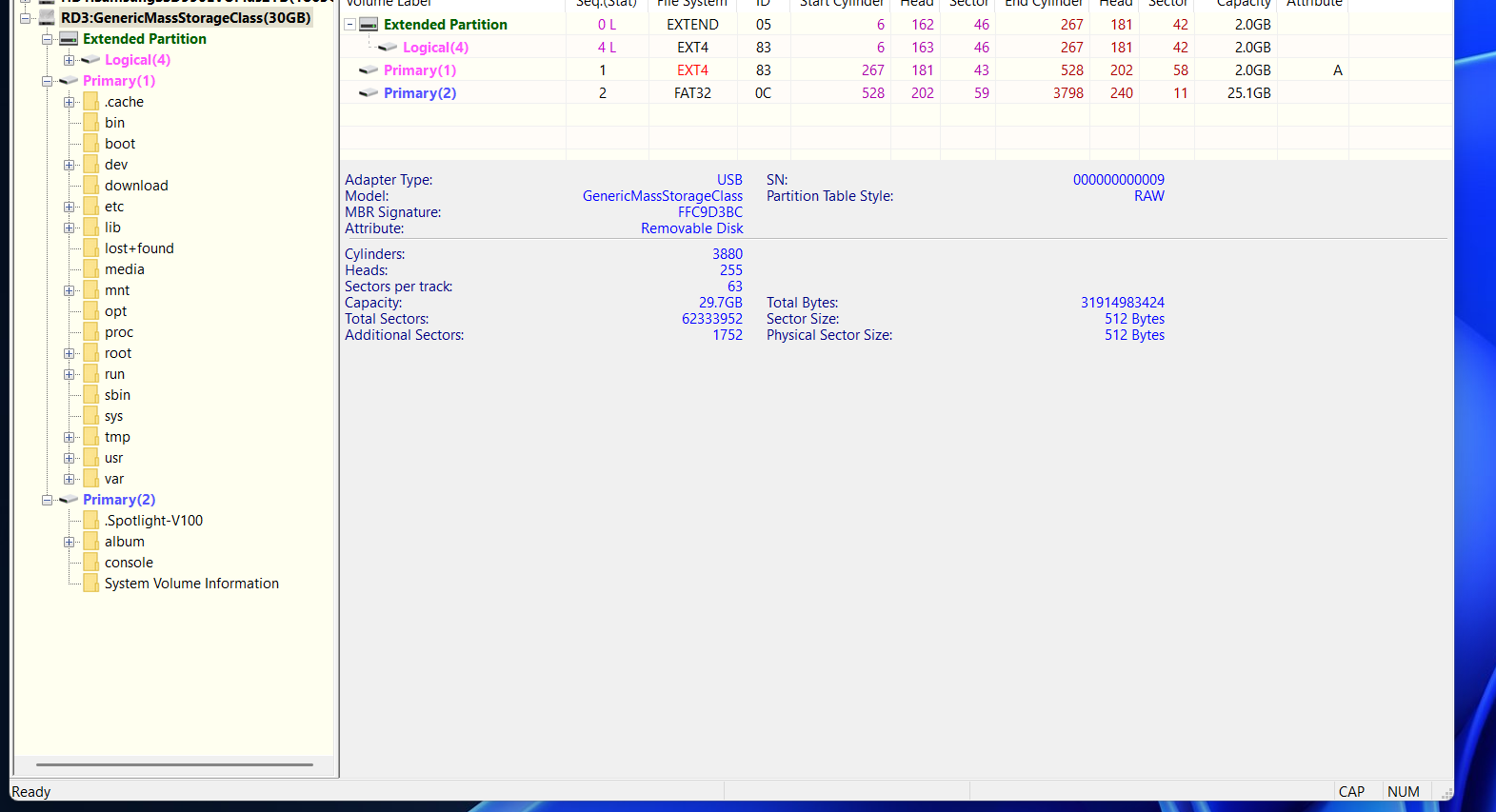
However it did not work. However i noticed that i do not have the same partitions on the device as shown in the guide linked.
Here is what i see in DiskGenius:

When connected, it does not show up in BeadaTools
Is there a way to reinstall the software on the SD card or something else i can try?
Thanks
-
Attachments
-
- image.png (137.45 KiB) Viewed 34356 times
-
esky-sh
- Posts: 2137
- Joined: Sat Dec 20, 2008 4:21 am
Post
by esky-sh » Fri Mar 21, 2025 8:09 pm
Is this a open box issue or you had pulled out the TF card and done something to it to cause this issue? This is very important for our service persons to do remote troubeshooting job since we can not arrive on spot.
-
esky-sh
- Posts: 2137
- Joined: Sat Dec 20, 2008 4:21 am
Post
by esky-sh » Fri Mar 21, 2025 8:20 pm
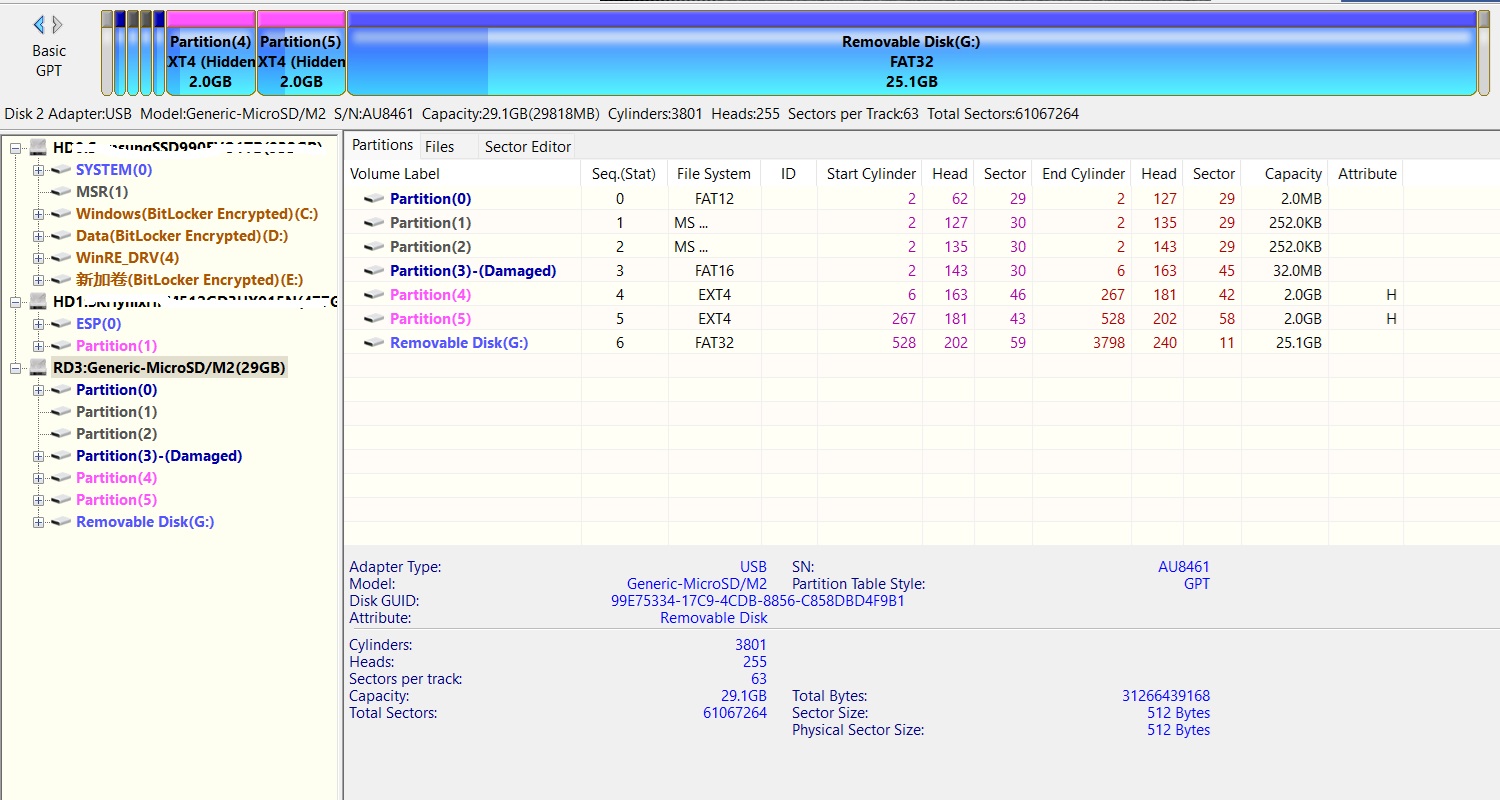
I attached a partitions layout chart of 2W and you can find it is completely different with the image you attached. So the TF image on your hand is not belong to a Model 2W and you wont expect it will work on your device at all.
- 无标题.jpg (274.32 KiB) Viewed 34354 times
-
almondsweave
- Posts: 3
- Joined: Fri Mar 21, 2025 6:01 pm
Post
by almondsweave » Fri Mar 21, 2025 9:37 pm
esky-sh wrote: ↑Fri Mar 21, 2025 8:09 pm
Is this a open box issue or you had pulled out the TF card and done something to it to cause this issue? This is very important for our service persons to do remote troubeshooting job since we can not arrive on spot.
These are the steps i went through roughly:
- Connect unit with included usb c to a cable to windows PC. Black screen
- Looked at forum/product page for potential missing software download. Doesnt look like i need anything
- Searched the threads on forum and found the above guide, so i found the SD card in the unit
- I first slotted it in to my mac since i was missing my adapter. On the mac i can see 1 partition with some images, videos and ini files. Nothing else
- On windows it pops up with a bunch of "broken" drives which i ignored as instructed
- Windows also shows the folder with images and videos and a drive with some boot image or something
- The image i showed is from opening it in DiskGenius
esky-sh wrote: ↑Fri Mar 21, 2025 8:20 pm
I attached a partitions layout chart of 2W and you can find it is completely different with the image you attached. So the TF image on your hand is not belong to a Model 2W and you wont expect it will work on your device at all.
无标题.jpg
As mentioned i also saw that the partitions do not show as the same on my SD compared to the linked post, so i assume thats the issue. As far as i can tell one of those partitions has linux on it but maybe its missing the boot part or something? I dont know if its a broken SD card or maybe broken partitioning table.
I have another SD card i can try but that requires me to have the image or whatever to write to the card.
Im assuming the reason its not showing up in windows is because it doesnt boot correctly.
Do you have any other suggestions i can check?
-
esky-sh
- Posts: 2137
- Joined: Sat Dec 20, 2008 4:21 am
Post
by esky-sh » Fri Mar 21, 2025 11:39 pm
The link you mentioned in your original post is for a bugfix of model 5C. I don’t think it makes any sense to model 2W. When you meet problems once you trying to use a new product out of box. You should contact seller rather than a pure blindly surfing over internet. Right now, you will have to contact seller for a factory recovery since they will need check your customer info. Of course, if you had already done a TF card backup before you did any operations to it. Then you will just need to write the backup image to your TF card and insert the card back to your device. The device will then recover to normal operation.
-
almondsweave
- Posts: 3
- Joined: Fri Mar 21, 2025 6:01 pm
Post
by almondsweave » Sat Mar 22, 2025 7:13 am
I dont think its fair to call it a blind search, when i went to this specific forum and found a black screen issue like the one i had.
Maybe the partition recreate that the post suggest has made the problem worse, but i dont see how it could have caused the problem from the start.
Anyways i was sent here by the support email, so i guess im writing back to that based on this thread.
Thanks for your help
Who is online
Users browsing this forum: No registered users and 24 guests