Hello again, so your .ini files were working wonderfully for 2 months before my beadapanel starting freezing during mp4 file playback. I thought another format would fix it so I tried it and copied back my files to the SD card but the same freeze was occurring after 5 mins. I figured I may as well try the steps in this thread you linked but after following the steps, beadatools no longer recognizes my device when it's plugged in and I'm back to a black screen. I attached a screenshot of what my partition table looks like. Thanks for your time
Beadapanel is unresponsive after tampering with SD card partitions
After following the steps in this thread https://www.esky-sh.com/bbs/viewtopic.p ... 8da7bd7e6b I feel like I may have bricked my Beadapanel in some way. From my initial post on the AIDA64 forums:
Hello again, so your .ini files were working wonderfully for 2 months before my beadapanel starting freezing during mp4 file playback. I thought another format would fix it so I tried it and copied back my files to the SD card but the same freeze was occurring after 5 mins. I figured I may as well try the steps in this thread you linked but after following the steps, beadatools no longer recognizes my device when it's plugged in and I'm back to a black screen. I attached a screenshot of what my partition table looks like. Thanks for your time

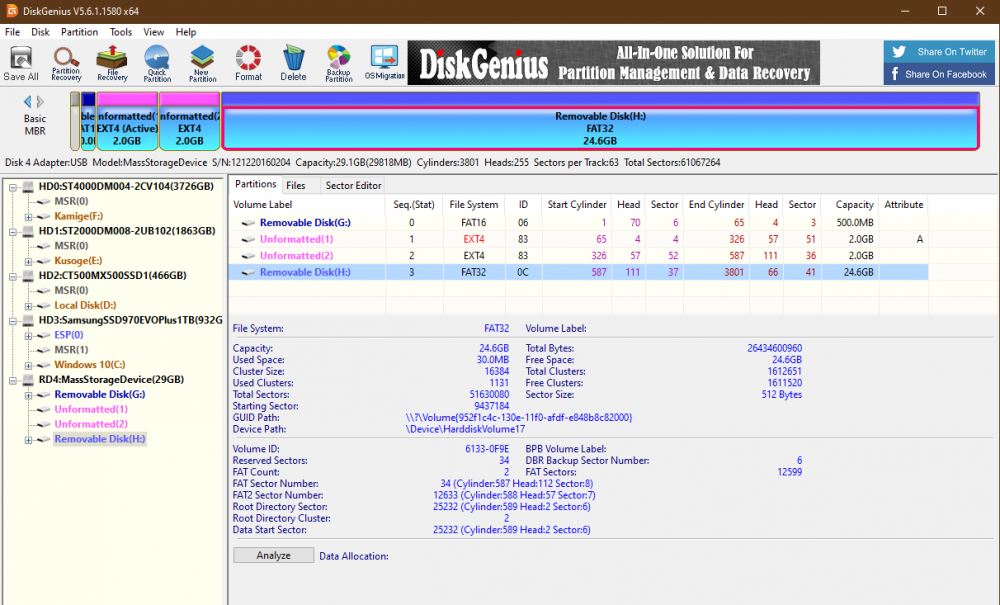
Hello again, so your .ini files were working wonderfully for 2 months before my beadapanel starting freezing during mp4 file playback. I thought another format would fix it so I tried it and copied back my files to the SD card but the same freeze was occurring after 5 mins. I figured I may as well try the steps in this thread you linked but after following the steps, beadatools no longer recognizes my device when it's plugged in and I'm back to a black screen. I attached a screenshot of what my partition table looks like. Thanks for your time
Re: Beadapanel is unresponsive after tampering with SD card partitions
Typically you wont brick your TF card if you do not click any buttons to allow Windows "check" or "recover' or 'scan' the card whenever you plugging it into your PC and whatever prompt window popping up. 
Did you find the LED blinking on PCB when you power up the screen via USB cable?
Re: Beadapanel is unresponsive after tampering with SD card partitions
If you mean the back of the PCB of my Beadapanel 5C, I actually don't see any blinking LEDs. The screen just turns on when I plug it in and that's about all I can observe.
Re: Beadapanel is unresponsive after tampering with SD card partitions
Did you find a usb device pop up in Windows device manager when you plug power on?
Re: Beadapanel is unresponsive after tampering with SD card partitions
I do not see any new devices pop up in Windows device manager and I don't hear the usual jingle that plays in Windows when you plug in a USB device.
Re: Beadapanel is unresponsive after tampering with SD card partitions
Please pull out the TF card and plugin power again. This time you should find an USB device under Windows device manager?
If answer is 'yes', then your FAT16 partition on TF card was corrupted now. Please:
Copy files on FAT16 partition
You can find 2 firmware files(winter-5c.dtb and zImage) on same google drive and copy these 2 files to FAT16 partition. If Windows report this FAT16 partition got corrupted then you can format it again before copy.
If answer is 'yes', then your FAT16 partition on TF card was corrupted now. Please:
Copy files on FAT16 partition
You can find 2 firmware files(winter-5c.dtb and zImage) on same google drive and copy these 2 files to FAT16 partition. If Windows report this FAT16 partition got corrupted then you can format it again before copy.
Re: Beadapanel is unresponsive after tampering with SD card partitions
Plugging in the device after pulling out the TF card does have it show up as a USB device in device manager. I managed to put the two firmware files on the FAT16 partition and powered on the device again with the TF card inside and I now see the blinking blue LED on the back while the screen turns on and off intermittently.
Re: Beadapanel is unresponsive after tampering with SD card partitions
Looks like file systems on 2 EXT4 partitions were corrupted. I have PM you a url for partition backup file in DiskGenius format, you can download and use DiskGenius to recover them.
https://www.esky-sh.com/bbs/viewtopic.p ... t=10#p3597
Re: Beadapanel is unresponsive after tampering with SD card partitions
Do I use the same file to recover both of the ext4 partitions?
Edit: I only recovered the active ext4 partition (the first one) and my panel seems to be revived
. Even MP4 file playback is no longer hanging, however I don't know how long this will last for, last time it took about a month and a half for problems to arise again. I will update you if the same behavior returns in the future.
Edit: I only recovered the active ext4 partition (the first one) and my panel seems to be revived
Re: Beadapanel is unresponsive after tampering with SD card partitions
Had you fix the partition overflow issue at a first? If the answer is yes, the problem you met ever which was caused by will definitely gone and never come back forever. 
Who is online
Users browsing this forum: No registered users and 171 guests