BeadaPanel Versatile Media Display
-
neoscope
- Posts: 20
- Joined: Tue Aug 20, 2024 8:58 pm
Post
by neoscope » Tue Aug 20, 2024 11:46 pm
esky-sh wrote: ↑Tue Aug 20, 2024 9:17 pm
We are sorry for the issue you met. We will quickly going through some steps for 100% ensure it is belong to hardware or software issue.
Could you mind backup a whole TF card image to a image file, compress it and upload it somewhere on cloud to let our support download and analysis in our lab? You can use tools like Diskgenius or Win32DiskImager to do this job.
Hi I sent the url to download the image file to you via private message.
Please help to check that one, thanks.
-
esky-sh
- Posts: 2137
- Joined: Sat Dec 20, 2008 4:21 am
Post
by esky-sh » Thu Aug 22, 2024 1:11 am
Looks like file systems on 2 EXT4 partitions were corrupted. We do not know the reason why corrupt yet. But I will PM you a url for partition backup file in DiskGenius format, you can download and use DiskGenius to recover them.
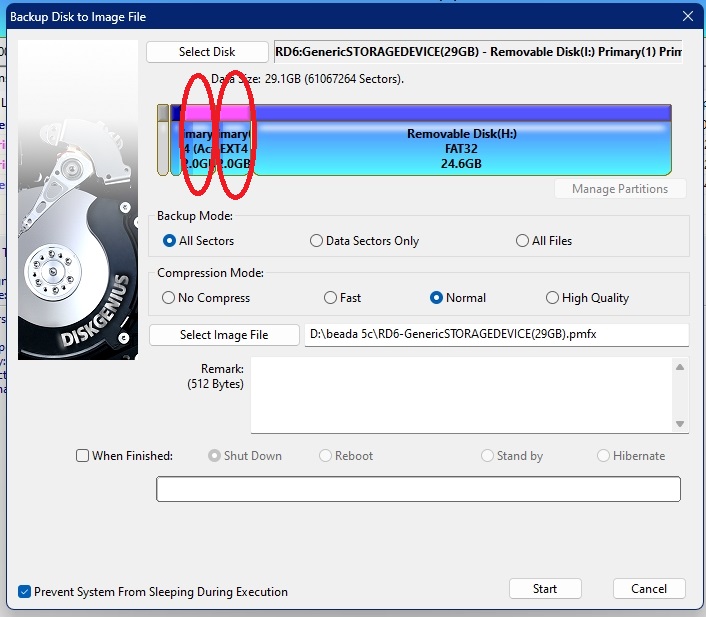
- beada5c partition.jpg (104.62 KiB) Viewed 110375 times
-
neoscope
- Posts: 20
- Joined: Tue Aug 20, 2024 8:58 pm
Post
by neoscope » Thu Aug 22, 2024 8:49 am
esky-sh wrote: ↑Thu Aug 22, 2024 1:11 am
Looks like file systems on 2 EXT4 partitions were corrupted. We do not know the reason why corrupt yet. But I will PM you a url for partition backup file in DiskGenius format, you can download and use DiskGenius to recover them.
beada5c partition.jpg
Hi I received your message, all is good. I dont know too what is the reason, but may I know how to update firmware so I can use Beada tools? I want to update some configuration. And also, is it possible for me to buy new TF/SD card then reformat it? I afraid my card is corrupted because of the hardware itself is failing.
-
neoscope
- Posts: 20
- Joined: Tue Aug 20, 2024 8:58 pm
Post
by neoscope » Thu Aug 22, 2024 6:46 pm
Ok its work now, thanks a lot.
-
neoscope
- Posts: 20
- Joined: Tue Aug 20, 2024 8:58 pm
Post
by neoscope » Sun Dec 15, 2024 10:59 pm
hi, its now happening again
but this time there is no blue led at all, any idea?
-
esky-sh
- Posts: 2137
- Joined: Sat Dec 20, 2008 4:21 am
Post
by esky-sh » Mon Dec 16, 2024 4:56 am
You can solve this partition overflow issue at first. You can find the link in my previous post.
-
neoscope
- Posts: 20
- Joined: Tue Aug 20, 2024 8:58 pm
Post
by neoscope » Mon Dec 16, 2024 8:25 am
esky-sh wrote: ↑Mon Dec 16, 2024 4:56 am
You can solve this partition overflow issue at first. You can find the link in my previous post.
Hi, sorry for late reply.
I tried it, but nothing happened so far. Do we have other way to make sure my current condition?
-
esky-sh
- Posts: 2137
- Joined: Sat Dec 20, 2008 4:21 am
Post
by esky-sh » Mon Dec 16, 2024 5:36 pm
So you had manually adjusted partition table on your TF card?
Who is online
Users browsing this forum: No registered users and 38 guests